
Best Routine Apps for Autistic Kids in 2026
A visual schedule works because it answers the question that causes most of the distress: what happens next, and when does this end. These six apps do that in different ways — picture cards, timers, a dedicated device, a shared family calendar — and they are not interchangeable. Which one fits depends most on whether your child reads, and on what part of the day actually breaks.
Updated 2026-09-21. Prices checked against each vendor's own pages.
Start with what breaks, not with the app
Parents usually arrive at this category from one of four different problems, and each points at a different tool:
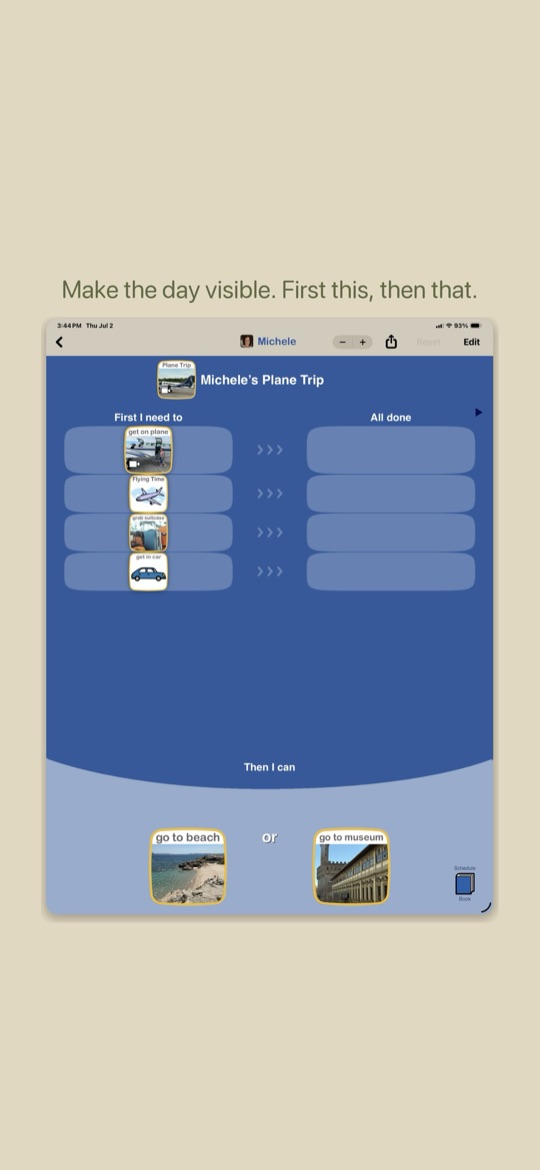
- Transitions. Leaving the house, ending screen time, moving from one activity to the next. You want first-then boards and timers that show time passing — Choiceworks and Goally.
- Not knowing the shape of the day. Repeated "when is lunch?", anxiety about what is coming. You want a picture schedule for the whole day — Lil Planner or Visual Schedule.
- Getting through a sequence. Morning routines that stall at step two. You want step-by-step prompting with a timer per step — Goally, or Lil Planner.
- An older child juggling school and their own plans. You want a real planner with visual structure, not a kids app — Tiimo, or a family routine calendar like Starday.
One practical note before you pay for anything: a child who does not yet read needs photographs or symbols on every step, and not every app on this list supports that. Where it matters we have said so.
The apps at a glance
| App | Best for | Visual support | Price | Platforms |
|---|---|---|---|---|
| Choiceworks | Transitions, waiting and feelings | Picture cards, first-then boards, waiting and feelings boards | $39.99 once, no subscription | iPhone and iPad; Android demo only |
| Lil Planner | A picture schedule the whole family shares | Illustrated steps, your own photos, rewards | Free tier; paid plan for more schedules and devices | iPhone, iPad, Android |
| Goally | Step-by-step routines on a distraction-free device | Video and picture steps, visual timers, emotion check-ins | Tablet from about $199; app manages the device | Goally tablet + parent app |
| Visual Schedule Daily Routine | A simple free picture timetable | Icon or photo per step with a time beside it | Free, with paid extras | iPhone and iPad |
| Tiimo | Autistic teens and adults planning their own day | Visual timeline, timers, widgets | Free tier. Pro $7.99/mo or $79.99/yr | iPhone, iPad, Android, web |
| Starday | A reading child, and siblings on one routine | Emoji-led task list, stars, streaks — not a symbol library | Free for the child’s side. Pro $4.99/mo or $29.99/yr | iPhone, Android, any browser |
1. Choiceworks, still the one therapists name first
Choiceworks has been the reference visual-support app for well over a decade, and it is the one most speech and occupational therapists will hand you. It does three things: a picture schedule board, a waiting board for "you will get it, but not yet", and a feelings board for naming and regulating an emotion. You build boards from its own image library or from photographs of your actual house, your actual car, your actual school.
Why it is the default recommendation
- Built with clinicians and refined over years in real classrooms and clinics, which is why it turns up on so many school and therapy recommendation lists.
- Pay once, $39.99, no subscription. Over three years it is cheaper than almost everything else here, and it keeps working if money gets tight.
- The waiting board is the feature parents single out — it gives a child a concrete answer to "when", which is often the whole fight.
- Your own photos throughout, so the schedule shows the real bathroom and the real bus, which matters a lot for generalisation.
- First-then structure is native, not bolted on.
Where it shows its age
- Effectively iPad and iPhone only. The Android listing is a demo, so an Android household should look further down this list.
- The interface is dated next to newer apps, and setup is manual: you are building boards, not picking a template.
- No cross-device sync of the kind families now expect — it lives on the device you set it up on.
- Nothing here rewards or motivates. It structures the day; it does not make a child want to do it.
2. Lil Planner, the best free visual schedule right now
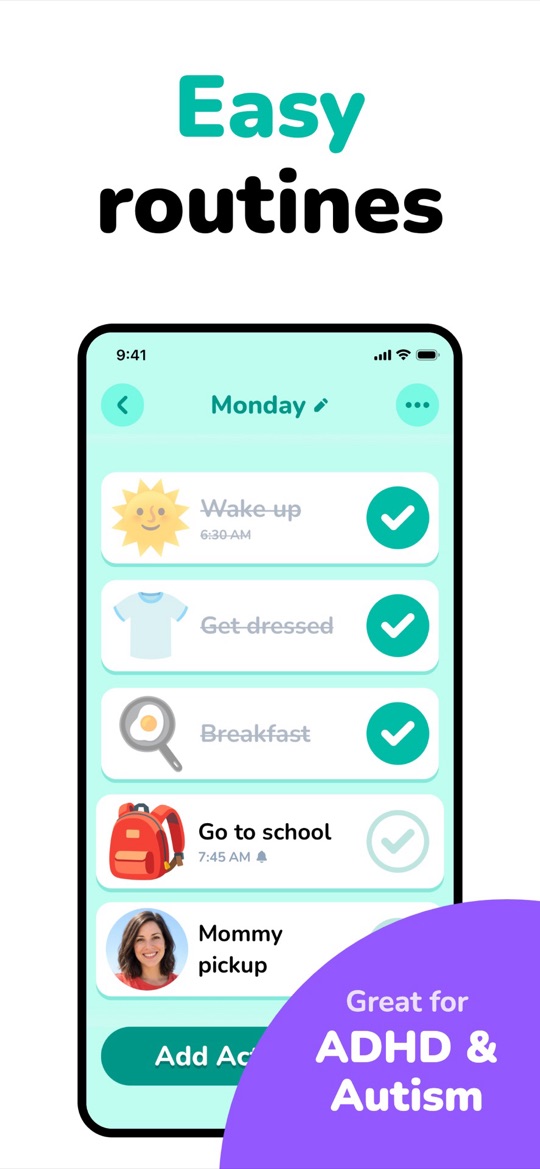
Lil Planner is the newest app on this page and the best-reviewed: 4.9 stars across more than 4,000 ratings on the App Store. It builds a day as a list of illustrated steps with times, and you can drop in a photo — the screenshot below uses a picture of the parent doing the pickup, which is exactly the kind of concrete cue that works. Steps tick off with a celebration, and you can attach rewards.
Good
- A usable free tier — enough schedules to run a real morning and evening routine before you decide whether to pay.
- Large, high-contrast, uncluttered design. Easy for a child to operate alone, which is the point of a visual schedule.
- Photos alongside the built-in illustrations, so steps can show your own home and the actual people involved.
- On iPhone, iPad and Android, and updated constantly — the App Store listing has changed several times this month alone.
Not so good
- The free tier limits how many schedules you can keep and, by most accounts, ties you to one device — the paid plan is where family sync lives.
- No waiting board or feelings board. It schedules the day; it does not help with the emotional regulation side the way Choiceworks does.
- Young as apps go, so there is less of a track record and less clinical literature behind it than Choiceworks has.
3. Goally, when a phone is the wrong device
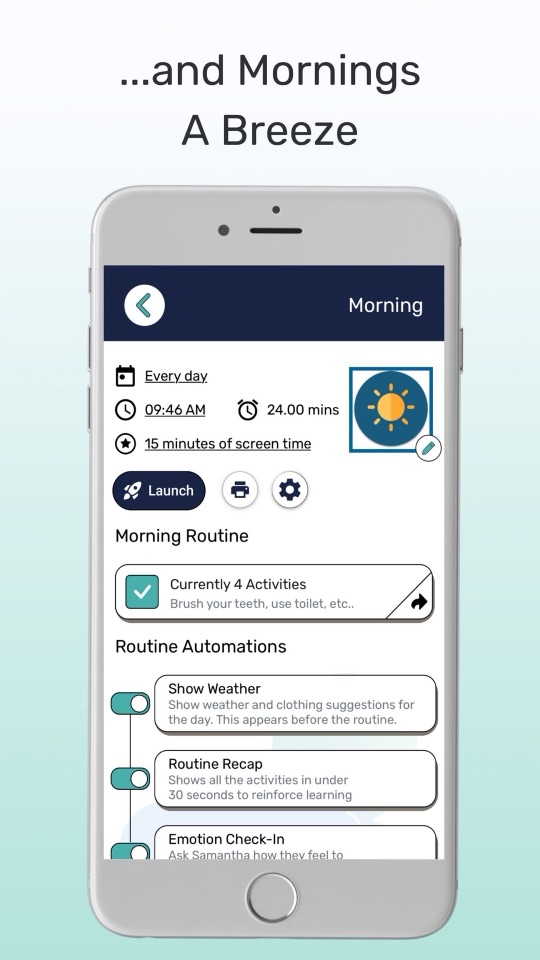
Goally is not really an app — it is a locked-down tablet for the child, managed from a parent app on your phone. Routines run step by step with video or picture prompts and a visual timer, and the device can dole out a fixed amount of screen time as the reward at the end. Because the tablet does nothing else, there is no YouTube two taps away from the morning routine.
Good
- No distractions, by construction. For a child who cannot be handed a normal tablet without losing the next hour, this is the entire argument for Goally.
- Step-by-step prompting with a timer per step, plus routine automations like a weather card before getting dressed and an emotion check-in afterwards.
- Screen time as a built-in, bounded reward rather than something you negotiate.
- Durable hardware intended for children, with a parent app on both iPhone and Android.
Not so good
- Far and away the most expensive option. Tablets start around $199 and run past $300 for the larger models, before any subscription — a different order of cost from a $39.99 app.
- A second device to charge, carry and lose. Some families find it stays at home and the routine stops travelling.
- The parent app’s ratings are the weakest here at about 4.3, and it was last updated in June 2026.
- Committing to hardware is a big bet to place before you know whether the format suits your child.
4. Visual Schedule Daily Routine, the simple free timetable
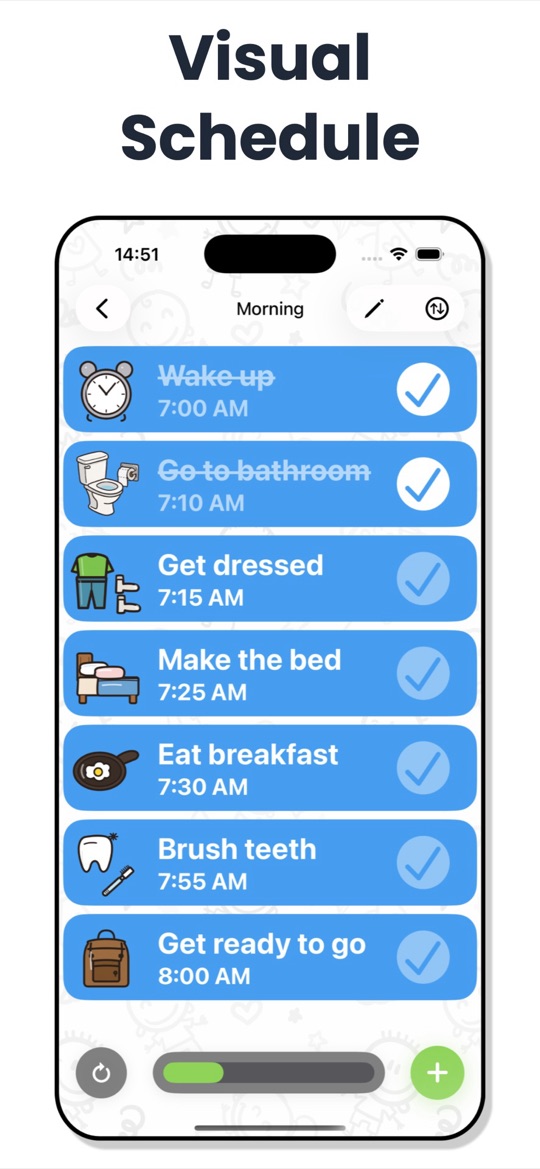
This one does exactly what the name says and nothing more: a list of steps, each with an icon or a photo and a time, that a child works down. Wake up at 7:00, bathroom at 7:10, dressed at 7:15. There is no account, no family sync and no reward economy — which, for a lot of families, is precisely why it gets used when more ambitious apps get abandoned.
Good
- Free to start, and the free version is enough to run a morning routine properly.
- Genuinely simple: big pictures, big times, nothing else on screen to explore or break.
- Quick to set up. You can have a working schedule in about ten minutes without learning a system.
Not so good
- iPhone and iPad only — there is no Android version we could verify.
- No first-then board, no waiting support, no feelings board.
- A single-parent-device app: nothing syncs to a second phone, school or another household.
- Ratings are solid rather than outstanding (about 4.4 from 800-odd), and it is maintained by one developer.
5. Tiimo, for autistic teens who plan their own day
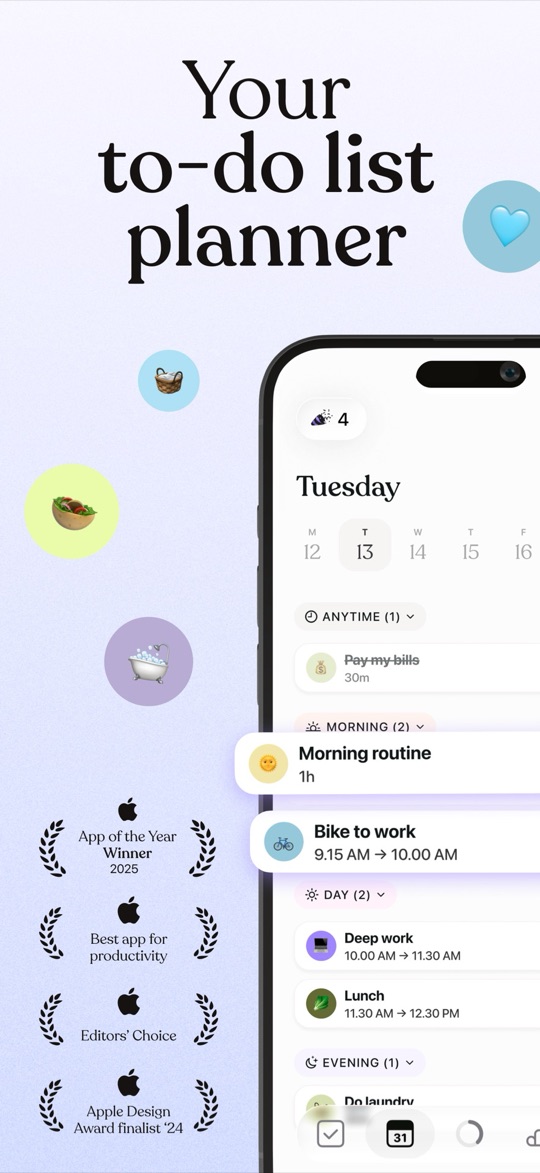
Tiimo is a visual day planner built explicitly for neurodivergent users — it won a Neurodiversity Award for assistive technology and was an Apple Design Award finalist. The day appears as a colour-coded timeline with durations, so time becomes something you can see rather than something you have to estimate. It is made for the person living the day, not for a parent assigning it.
Good
- Designed with autistic and ADHD adults rather than adapted for them, and it shows in how much control the user has over structure and notifications.
- The timeline view makes duration visible, which helps enormously with the "we leave in twenty minutes" problem.
- Widgets and cross-platform sync, so the plan is on the lock screen rather than inside an app nobody opens.
- Grown-up design. A 15 year old will not feel patronised using it, which is why it survives where kids apps get deleted.
Not so good
- Not a young child’s app. The screenshots show adult tasks and the reading load is real — under about 11 this is the wrong tool.
- Pro is $7.99 a month or $79.99 a year, the most expensive subscription on this page.
- No parent view, no assigning, no oversight. That is deliberate, but it means you cannot use it to run a household routine.
- No picture-symbol library for non-readers.
6. Starday, for a reading child and the rest of the family
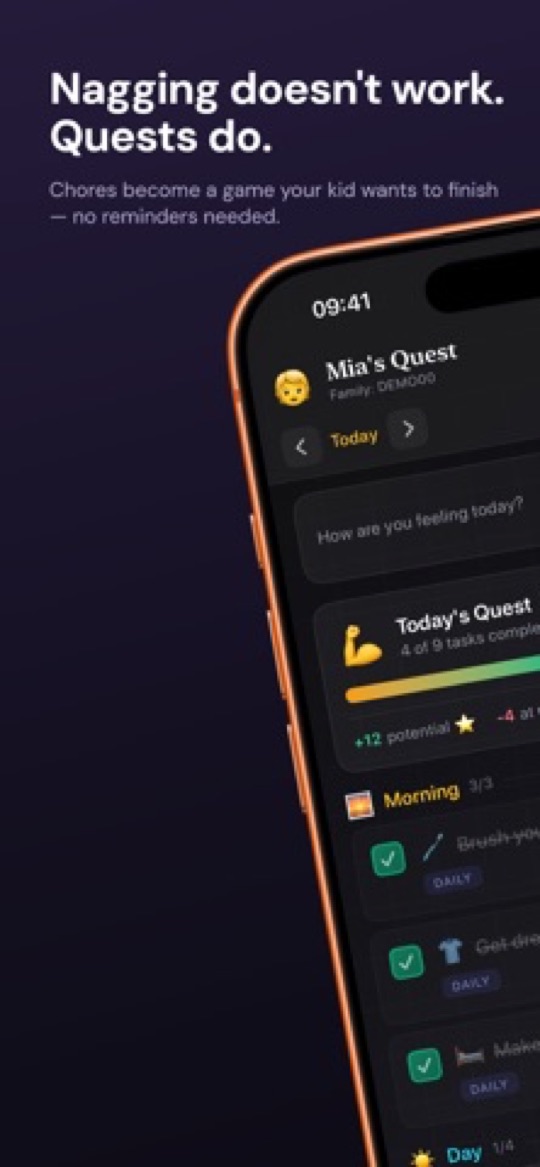
Starday is a routine calendar for the whole family rather than a clinical visual-support tool, and it is worth being straight about that: it has no symbol library, no first-then board and no waiting timer. What it does have is a predictable day a child works through alone — morning, daytime and evening, each task emoji-led and checked off for stars that buy rewards you stock. If your child reads, if the schedule itself is the need, and if siblings are on the same system, it covers the whole house for one price.
Where it earns a place
- The same routine on every device. One family code covers iPhone, Android and any browser, so the schedule is identical at home, at a grandparent’s and in the other parent’s house — something most apps here cannot do.
- Predictability without approval. Tasks pay out the instant they are checked. Nothing waits on a parent noticing, which keeps the day from stalling.
- Covers siblings too. Pro is $4.99 a month or $29.99 a year for every child in the family, where several apps here charge per child or per device.
- Mood tracking is one tap a day, and a month of it is genuinely useful evidence to take to a school meeting or a paediatrician.
- Routine packs by age, plus add-ons for hygiene, movement, music practice and eating, so you are not building the day from an empty screen.
When to pick something else on this page
- Not built for a non-reading child. Tasks are text with an emoji, not photographs or PECS-style symbols. Choiceworks, Lil Planner or Visual Schedule are the right answer there.
- No transition support. There is no first-then board, no waiting board and no per-step timer, so if transitions are the crisis point this is not the tool.
- No feelings or regulation board beyond the daily mood tap.
- It is a mainstream family app, not an assistive-technology product, and it has not been through any clinical validation.
How to choose
- Transitions and waiting are the crisis: Choiceworks, and budget the $39.99 once.
- You want a picture schedule and you want to try it free: Lil Planner, then Visual Schedule if you want something even simpler.
- A normal tablet is impossible in your house: Goally, if you can carry the hardware cost.
- Your child is a teenager running their own day: Tiimo.
- Your child reads, and you want one routine across siblings and households: Starday.
A last word on sequencing: most therapists suggest getting the routine right on paper before it goes near a screen, because a printed strip on the wall is easier to change while you are still working out what the day should look like. Our free printable routine checklists by age are a reasonable starting point, and the daily hygiene checklist is deliberately short — three steps, repeated, which is usually where a visual schedule should begin.
Screenshots are each app’s own App Store listing images and belong to their publishers. Prices, ratings and availability were checked on 2026-09-21. Brili Routines is missing from this list on purpose: its children’s app has been removed from both the US App Store and Google Play, and the remaining Brili listing is an adults’ habit tracker rated 17+ that has not been updated since November 2025. This page is written for parents choosing a tool and is not clinical advice — your child’s speech or occupational therapist will have a view on which format suits them, and that view should win.
Turn this checklist into quests
Paper charts die in a week. In Starday, every task on this list becomes a quest your child checks off on their own — earning stars they spend in a rewards shop you control. One family code syncs every device.


Parents ask
What is the best visual schedule app for autistic children?
Choiceworks remains the most widely recommended by therapists: it covers picture schedules, first-then boards, waiting and feelings, and costs $39.99 once with no subscription. Its main limitation is that it is effectively iPad and iPhone only. On Android, or if you want to try before paying, Lil Planner is the strongest current alternative and has the highest App Store rating in this category.
Is there a free routine app for autistic kids?
Yes. Lil Planner and Visual Schedule Daily Routine both have free tiers that are enough to run a real morning routine, though both restrict how many schedules you keep and how many devices sync. Tiimo has a free tier aimed at older users. Starday is free permanently on the child’s side, with a 7-day trial of the parent features. Choiceworks has no free version, and Goally requires buying a tablet.
Do visual schedules actually help autistic children?
Visual supports are among the better-established practices in autism education, and they are widely used in classrooms for the same reason parents reach for them at home: they make the sequence and the end point of an activity concrete, which reduces the uncertainty that drives a lot of distress around transitions. What varies is format — some children need photographs, some symbols, some just a written list — so the useful question is which representation your child reads most easily, not whether schedules work in general.
What happened to the Brili Routines app for kids?
Brili’s children’s app, Brili Routines – Visual Timer, is no longer listed on the US App Store or on Google Play as of September 2026. The remaining Brili listing is an adult habit tracker rated 17+ whose last update was November 2025. Plenty of older recommendation lists still include it, so it is worth checking the store link before you plan around it.
Which routine app works for a non-reading child?
Choose one that puts a picture on every step: Choiceworks, Lil Planner or Visual Schedule Daily Routine all let you use the built-in image library or your own photographs. Photographs of your actual kitchen and your actual school bag tend to work better than generic symbols. Text-led apps, including Starday, are the wrong fit until a child reads confidently.
Can one app cover an autistic child and their siblings?
Sometimes, but it is usually a compromise. Purpose-built visual-support apps are priced and designed around one child, while family apps like Starday or S’moresUp cover everyone for one price but lack first-then boards and symbol libraries. Many families end up running both: a visual-support app for the child who needs it, and one family routine app so the household shares a single schedule.
Free printable checklists
- Routine checklists for kids by age — the task packs that ship in Starday, as PDFs.